

Blogs

Date 29 June 2026
JMeter comes with a very useful Debug Sampler which can be used to troubleshoot your script variables. The sampler spits out all variable names and values including arrays; from a regular expression extractor for example.
You can add the Debug Sampler by right clicking the thread group, Add, Sampler, Debug Sampler.
Make sure you also have the Results Tree listener so you can actually view the debug sampler.
Below is an example of the output of the debug sampler.
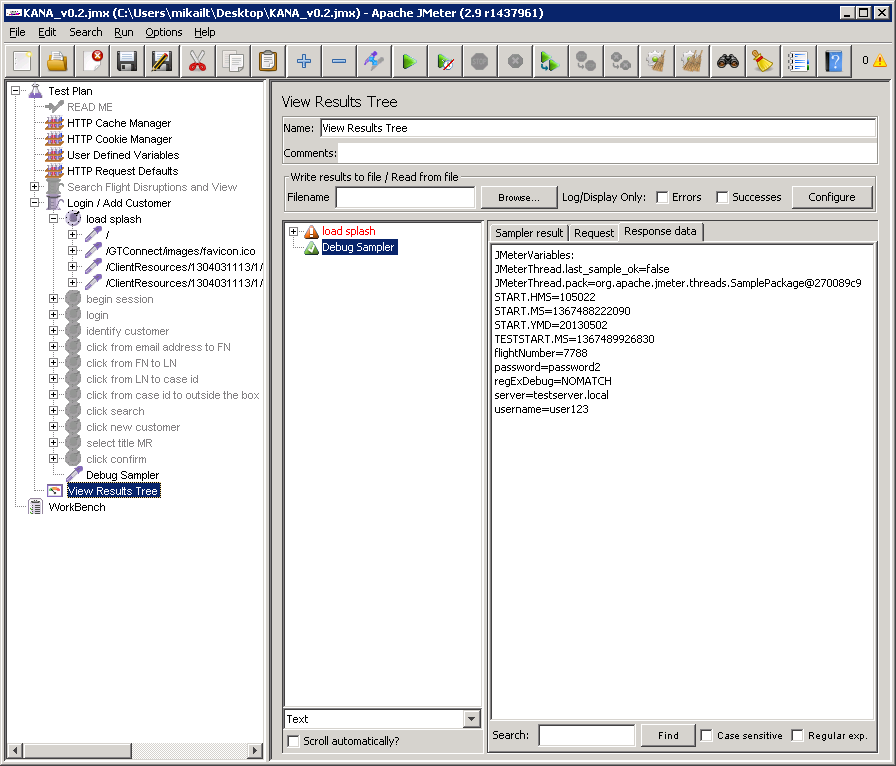
If you have a lot of variables in your script, it would definitely be useful to include the debug sampler and check it out once in a while to make sure you see what you expect to see.
Don’t forget to disable the debug sampler when you actually start testing!
If you would like to learn more about our Capacity and Performance management - download our ebook here.


About the author
Team Capacitas

FinOps and AI: Building the Financial Discipline for the Next Wave of Enterprise Intelligence
AI FinOps represents an evolution rather than a replacement of traditional FinOps. It extends the model into a domain where financial, technical, and product decisions are tightly interconnected.

Confidence Under Load: How We Verified AKS Readiness for Peak
How Capacitas verified AKS readiness for peak demand by validating workload performance, autoscaling, cluster capacity, monitoring, and incident response.
Building Cloud Resilience: Lessons from the AWS Outage
Learning from the Latest Outage. Events like this week’s AWS disruption highlight one clear truth: resilience must be designed, not assumed.

Bringing Order to Chaos: A Practical Guide to Chaos Testing in the Cloud
In today’s cloud-native environments, resilience is not optional—it’s critical. Chaos testing has emerged as a key practice for validating system behaviour under failure conditions.