In my previous blog I touched upon several areas where the value of Agile performance testing could be improved. This blog continues with the same theme, considering 6 additional ideas to improve the testing.
Analysis in performance testing can be time consuming. This can lead to frustration amongst the Agile development team.
Load generation tool providers usually provide a means of capturing performance metrics from the end points, and graphing from a single analysis view. These allow an opportunity to visually correlate a broad range of different metrics alongside load testing metrics. Reports invariably can be scheduled with pre-defined reporting templates. In general, these analysis facilities are slick and the outputs can easily be shared. In short, this is a good feature.
However, there are limitations that necessitate supplementary approaches to be taken,
Whilst load tools are getting more sophisticated at results analysis and comparison, they remain some way off meeting requirements for a large range of uses. Load tools were never originally built as sophisticated analysis tools so this is not too much of a surprise.
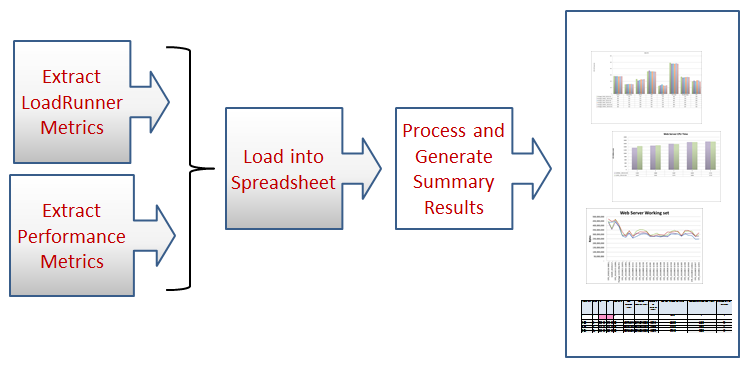
Building in the automation of results analysis to extend the capability of the load tool is a challenging but valuable task. It is possible to build this analysis layer at low cost with MS Excel VBA macros to provide an efficient and effective supplementary analysis layer.
The main advantages of this approach are as follows:
Testing ‘downtime’ is invariably unavoidable and frustrating. However, time-wastage during sprint can be disruptive and potentially harmful to delivery schedules. In this respect I characterise avoidable time wastage as ‘lost-time’. Examples of ‘lost-time’ include the following:
In reality the list of potential ‘lost time’ causes is extensive. In many cases lost-time is avoidable.
Before addressing these points, it is recommended that you understand where time is being lost. The recommendation of this blog is that before taking action you should carefully record and subsequently analyse where your ‘lost-time’ and ‘down-time’ is leaking. Another benefit of logging time is that you have a real record that can be used to influence where testing improvement initiatives should be directed.
No matter how efficient the performance tester it is unlikely that you will fully utilise a single performance environment. Indeed with multiple Sprint teams it is likely that there will be contention for the environment.
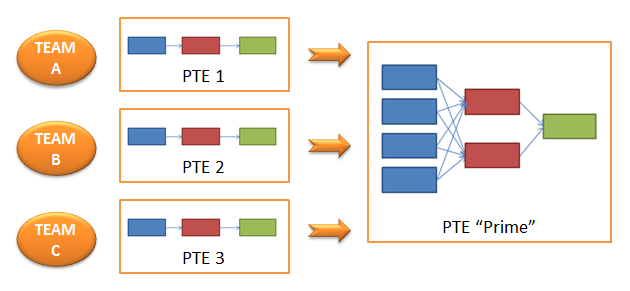
A more pragmatic albeit costly solution is to increase the performance testing environments (PTE), tools, and resources to support parallel testing streams. An increasingly popular model in Agile is to have cut-down environments linked with individual development teams. This presents performance testers an opportunity to work effectively with a small group of developers at a much earlier point in Sprint, on a targeted set of features. The model below shows 3 cut down PTE’s and 3 performance testers each allied to discrete development teams. This model works well as it shows the impact of change relative to a baseline established in the given cut-down PTE, and allows the Performance Tester to closely collaborate with the developers influencing their approach to the solution. The feedback loop with the developers is tight and efficient.
The performance testing process eventually scales up into highly scaled PTE environment (PTE “Prime”). At this stage in Sprint a number of performance testing defects have been isolated in PTE1/2/3 and resolved by development teams. The “Prime” environment should be as like-live as possible. The objective of the larger scale performance testing environment is to identify performance bottlenecks that manifest under higher load on a more realistic target architecture.
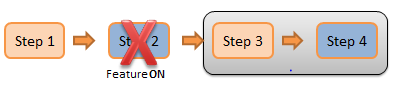
Building the ability to disable/enable application feature into software will dramatically improve your chances of being able to make progress on feature performance testing and facilitate testing from early stages of development. The simple scenario below amplifies this point.
Consider a four step test script of a web based process with feature changes impacting Steps 2 & 4 (highlighted in blue):
During the execution of the script Step 2 fails as the feature change is not stable. Steps 3 and 4 are unable to Complete. Application configuration has been set to ‘enabled’ to allow the feature to be tested.
By disabling the feature on Step 2 it is now possible to make progress in the execution to allow the feature change in Step 4 to be tested. Whilst this is not an ideal situation it does facilitate progress in testing as it allows the unique performance traits of the feature change in Step 4 to be compared relative to baseline. In short, application configurability permits greater control and flexibility in all areas of testing, and upholds a key tenet of Agile/Sprint to make progress ‘where you can’
In this simple example, once the issues related to Step 2 have been resolved the script will need to be re-tested. In practice the use of configuration can be more elaborate. For example, there may be a dependency between Step 2 and Step 4 with Feature ON, therefore it is not possible to test Step 4 in isolation.
Performance and Capacity modelling is often perceived as a ‘dark art’ and as a consequence is often avoided. However this view undermines the value that can be realised,
Consider a real situation where capacity forecasts are produced as a product of testing,
a) An existing capacity model uses as input the measured CPU Service time transaction costs for the main transactions.
b) At the end of each Sprint cycle the capacity model is rerun using the new CPU service times obtained for the release.
c) Capacity of production infrastructure is forecasted before Sprint closure.
d) If CPU usage is predicted to be excessive then efficiency issues are resolved before the changes are released.
The modelling process outlined above is quick, lightweight, and reliable. In this example, the method of capacity assessment has been operating successfully for many years.
Whilst the notion of automation is not a new idea, it is worth re-iterating. The benefit of automating standard performance testing procedures is realised by improved productivity. Listed below are some examples of where automation can help:
…and so on (examples of scripts that perform these functions are available upon request).
If you would like to learn more about our Modelling and Performance testing solutions, please click below, to see our latest webinar.