

Blogs
Date 29 June 2026
Full series: capacity modelling guide
In part 1 of this series, we discussed the data that is needed for capacity modelling and the use of a trend of historical resource data, where forecasts of business data are not forthcoming. The initial step to developing this type of forecast was to analyse the historical resource data to ensure that a trend could be identified.
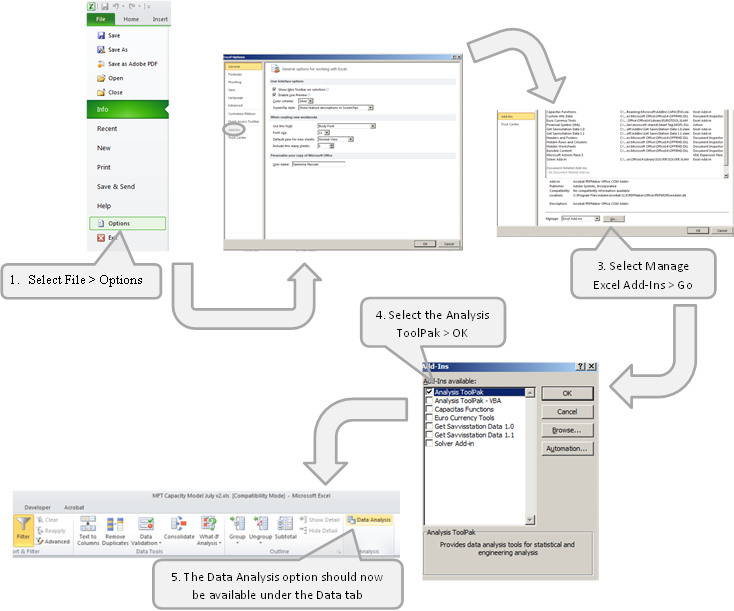
Following on from that, this blog will describe how to generate the capacity forecast, using the historical component data. A trend essentially involves drawing a straight line through the historical data and then using the inclination of this straight line to determine the forecast values into the future. Microsoft Excel has built-in Regression analysis functionality, which allows you to determine the gradient and intercept of the straight line. This may not be enabled in your Microsoft Excel installation by standard. To activate it, follow these steps in Microsoft Excel 2010:
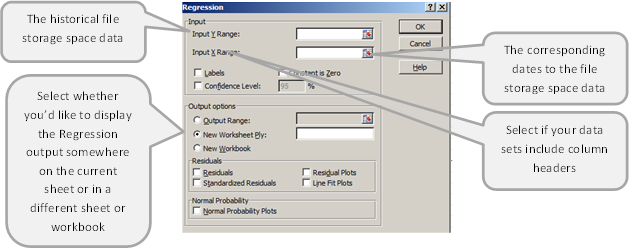
Selecting Data Analysis from the toolbar then allows you to perform various analytical methods on your data sets. One of these is “Regression”, which determines the relationship between two sets of variables. In our case, the tool will determine how the file storage space changes with time. The Regression tool requires the following inputs:
The output of the Regression analysis is as follows:
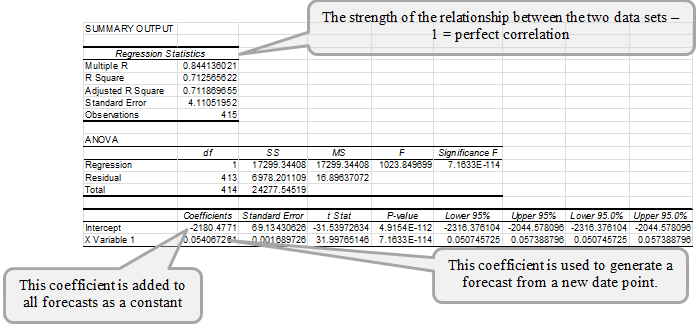
Alternatively, the Intercept can be determined using the in-built Microsoft Excel INTERCEPT function, where the same data sets are passed as arguments. Similarly, the “X Variable 1” Coefficient can be calculated using the SLOPE function and the R Square can be computed from the RSQ function.
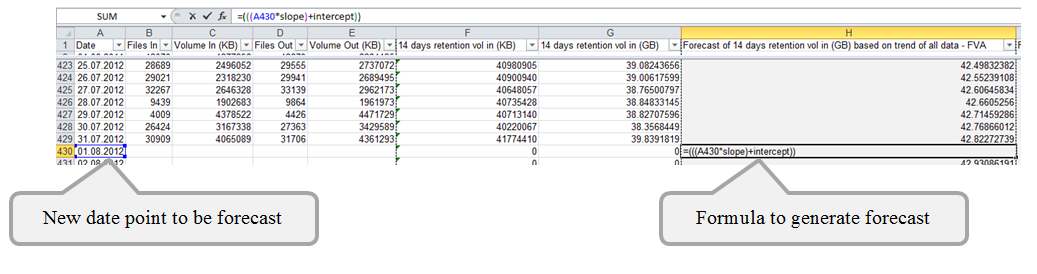
The two coefficients can then be used for generating a forecast of file storage space used on any future date using the following formula:
(
In the screenshot below, the cell where the SLOPE and INTERCEPT have been calculated have been named as SLOPE and INTERCEPT for ease of reference:
That’s it for this week; by this point you should have forecast resource values based on the historical trend over time. For some of you, that might be all you need to achieve – and in that case, wasn’t it easy?! However, if you expect your model to be used by others and you want to make it more user-friendly and flexible with options for modelling various scenarios, watch out for the next part of this series.

About the author
Team Capacitas

FinOps and AI: Building the Financial Discipline for the Next Wave of Enterprise Intelligence
AI FinOps represents an evolution rather than a replacement of traditional FinOps. It extends the model into a domain where financial, technical, and product decisions are tightly interconnected.

Confidence Under Load: How We Verified AKS Readiness for Peak
How Capacitas verified AKS readiness for peak demand by validating workload performance, autoscaling, cluster capacity, monitoring, and incident response.
Building Cloud Resilience: Lessons from the AWS Outage
Learning from the Latest Outage. Events like this week’s AWS disruption highlight one clear truth: resilience must be designed, not assumed.
Bringing Order to Chaos: A Practical Guide to Chaos Testing in the Cloud
In today’s cloud-native environments, resilience is not optional—it’s critical. Chaos testing has emerged as a key practice for validating system behaviour under failure conditions.