

Blogs
Date 29 June 2026
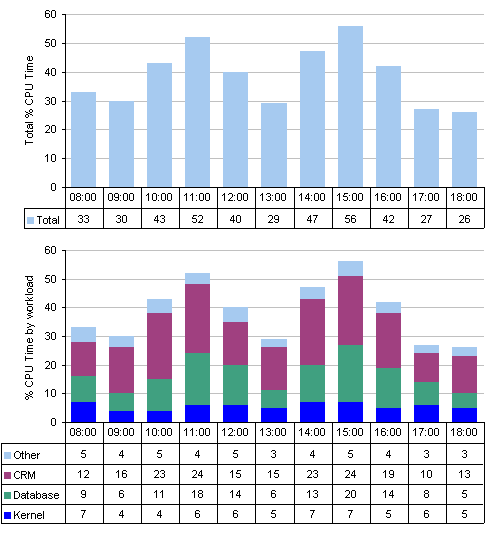
Workload characterisation is the method by which the total resource utilisation is broken down into groups of resource consumers, or workloads. Each workload represents some meaningful group of applications, processes or set of users, and may be related to a business process or activity. The following graphs show the % CPU time on a server, represented both as a total, and then by workload.
Taking the time to conduct workload characterisation on the high-risk components of your system will allow you to identify trends on a per-user or per-application basis. The author has developed a set of tips to help the capacity planner conduct workload characterisation on their systems. This list should be used as a guide and is not exhaustive.
- Measure the global resource utilisation
The total resource utilisation on each component of the system should be measured to determine what level of workload characterisation is cost-effective. For example, it is unlikely to be appropriate to conduct workload characterisation for CPU resources on a server with a peak hour % CPU time of 15%. It may only be worthwhile conducting workload characterisation on those components that are considered to be high risk or are approaching capacity. - Use an appropriate level of detail
Too many small, intricate workloads can confuse, and prove time-consuming to main - tain. As a rule of thumb, a workload that uses less than 2% of the peak hours resource is too small to be of use. Conversely, workloads that are too broadly defined may not deliver the full benefits of the exercise. Effective workload characterisation strikes a balance between these two.
- Identifying workloads
Where more than one application is running on a shared environment, it should be fairly simple to identify the processes associated with each application. For example, the following process names constitute a Sun ONE Server workload on a Solaris node:- Two application server daemon processes for each server instance (appservd)
- Each application server daemon process has a companion watchdog process (appservd-wdog)
- A single java process with multiple threads (java)
- The CGI engine creates processes as required (cgistub)
- A wrapper for the java process (imqbrokerd)
Breaking down the usage of applications into workloads representing groups of users may be more challenging, especially if they all processed under the same user ID. In this instance additional application-specific monitoring tools may be required.
- Give your workloads appropriate names
Where possible, give your workloads names that may be understood by the business. However, in a political environment, exercise caution when using workload names based on a group of users, as they may be sensitive to perceived criticism. - Define a catch-all workload
Any work that falls outside of the defined workloads is typically assigned to a catch-all workload. Ideally, you should aim to account for at least 80% of the peak hours utilisation. For example, if the peak hour % CPU Time is 50%, the catch-all workload should not exceed 10%. - Be consistent
Try to ensure that workloads on similar nodes are given identical names. For example, do not define a Solaris workload on one server and a Kernel workload on another. - Automate
Once the workload characterisation exercise is complete, consider using a tool or tools to automate the process. Many 3rd party capacity planning tools provide the ability to conduct workload characterisation using pattern matching on variables such as process and user names. This may be conducted automatically once the required filters are set up. - Review over time
Monitor the workload characterisation on an ongoing basis to ensure the unaccounted resource does not exceed 20%. As workloads change or new services are run on the system, revise the workload characterisation policy to reflect this. Unexpected large amounts of unaccounted resource utilisation should be investigated further. - Keep the original data
Storing the original resource utilisation data means that if new workloads are identified, they may be applied to historical data.
Storing the original resource utilisation data means that if new workloads are identified, they may be applied to historical data.
Bibliography
Best Practice for Service Delivery - Office of Government Commerce (ISBN 0 11 330017 4)

About the author
Team Capacitas

FinOps and AI: Building the Financial Discipline for the Next Wave of Enterprise Intelligence
AI FinOps represents an evolution rather than a replacement of traditional FinOps. It extends the model into a domain where financial, technical, and product decisions are tightly interconnected.

Confidence Under Load: How We Verified AKS Readiness for Peak
How Capacitas verified AKS readiness for peak demand by validating workload performance, autoscaling, cluster capacity, monitoring, and incident response.
Building Cloud Resilience: Lessons from the AWS Outage
Learning from the Latest Outage. Events like this week’s AWS disruption highlight one clear truth: resilience must be designed, not assumed.
Bringing Order to Chaos: A Practical Guide to Chaos Testing in the Cloud
In today’s cloud-native environments, resilience is not optional—it’s critical. Chaos testing has emerged as a key practice for validating system behaviour under failure conditions.