

Blogs
Date 29 June 2026
Very often when analysing performance test runs, there is the need to compare the performance log data to some other runs to know whether performance is acceptable or not. For example if we have to compare how the sqlservr process is running on a new release compared to the baseline on a previous release.
It is quite a tedious task to extract the data from Windows Performance Monitor, export it to csv format, import it in a spreadsheet and create charts to compare them. There is a very handy feature in newer versions of Windows (Windows Server 2008 R2, Vista, Windows 7) that allows you to compare multiple performance monitor log files very quickly by launching Windows Performance Monitor in comparison mode.
To open Perfmon in comparison mode, simply type in perfmon /sys /comp in the ‘Run’ box. Open your first performance log file then open another instance of Perfmon in comparison mode and load your second log file.
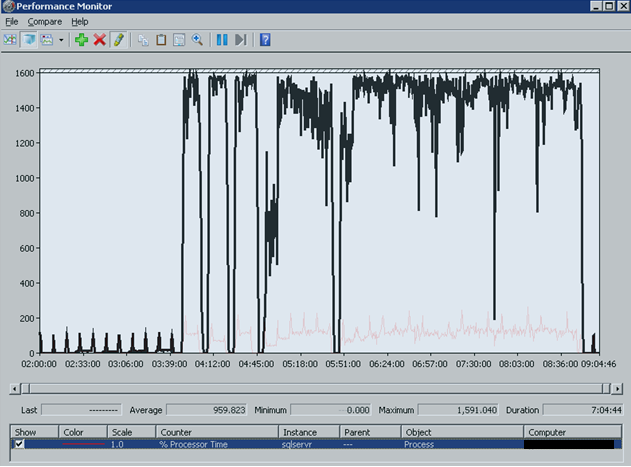
Both Perfmon windows will be in an opaque state at first; to change the transparency, select ‘Compare’ from the menu and set the transparency to your desired level for each window. Once you have selected the transparency levels, select ‘Snap to Compare’ from the ‘Compare’ menu and both windows will be aligned in the same position for better comparison.
In the image below, one of the windows had a transparency of 40% and the other of 70%.

About the author
Team Capacitas

FinOps and AI: Building the Financial Discipline for the Next Wave of Enterprise Intelligence
AI FinOps represents an evolution rather than a replacement of traditional FinOps. It extends the model into a domain where financial, technical, and product decisions are tightly interconnected.

Confidence Under Load: How We Verified AKS Readiness for Peak
How Capacitas verified AKS readiness for peak demand by validating workload performance, autoscaling, cluster capacity, monitoring, and incident response.
Building Cloud Resilience: Lessons from the AWS Outage
Learning from the Latest Outage. Events like this week’s AWS disruption highlight one clear truth: resilience must be designed, not assumed.
Bringing Order to Chaos: A Practical Guide to Chaos Testing in the Cloud
In today’s cloud-native environments, resilience is not optional—it’s critical. Chaos testing has emerged as a key practice for validating system behaviour under failure conditions.